
[Apr-2026] Exam F5CAB5: New Brain Dump Professional - TestBraindump
Free F5CAB5 Exam Dumps to Improve Exam Score
NEW QUESTION # 40
A user wants to use the iHealth Upgrade Advisor to determine any issues with upgrading TMOS. Where can the user generate the QKView to upload to iHealth?
- A. System > Software Management
- B. System > Configuration
- C. System > Archives
- D. System > Support
Answer: D
Explanation:
To utilize the F5 iHealth service, a BIG-IP Administrator must generate a diagnostic snapshot of the system known as a QKView file.
* GUI Path: In the BIG-IP Configuration Utility (GUI), the QKView generation tool is located under System > Support.
* Process: On the Support page, the user selects the "New Support Snapshot" button. From there, they ensure "QKView" is selected. Once the BIG-IP finishes collecting the data (which includes logs, configuration, and hardware statistics), the user can download the resulting .qkview file directly to their local machine.
* iHealth Integration: This file is then uploaded to ihealth.f5.com. The Upgrade Advisor tool within iHealth specifically parses this QKView to check the current configuration against known bugs, hardware limitations, or syntax changes in the target TMOS version.
* Evaluation of Other Options:
* System > Configuration (Option B): This section contains general system settings like DNS, NTP, and SNMP, but does not contain diagnostic tools.
* System > Software Management (Option C): This is where new TMOS images (.iso files) are uploaded and installed, but it is not used for generating diagnostic reports.
* System > Archives (Option D): This is used to create and manage UCS (User Configuration Set) files, which are full system backups. While UCS files contain configuration, they do not contain the deep diagnostic logs and hardware stats required by iHealth for an Upgrade Advisor analysis.
NEW QUESTION # 41
The BIG-IP Administrator is investigating disk utilization on the BIG-IP device. (Exhibit shows /dev/md4 mounted on / at 100% utilization). What should the BIG-IP Administrator check next?
- A. Large files on the / file system
- B. Results from the EUD test
- C. Results from the platform diagnostics test
- D. Large files on /usr file system
Answer: A
Explanation:
Comprehensive and Detailed Explanation From BIG-IP Administration Support and Troubleshooting documents: Monitoring resource utilization is essential for maintaining system stability. If the root (/) file system reaches 100% capacity, the BIG-IP may become unresponsive, fail to save configuration changes, or experience daemon crashes83. When the / partition is full, the immediate troubleshooting step is to identify large or unnecessary files-such as old log files, core dumps, or temporary installer files-located specifically within that file system84. In the provided exhibit, /dev/md4 is explicitly listed at 100% usage for the / mount point85. Checking other partitions like /usr (which is at 82% in the exhibit) would not resolve the immediate "Full" status of the root directory86. Administrators often use the du (disk usage) command via the CLI to find the problematic files. Managing disk space is a proactive task; however, when utilization hits 100%, it becomes a reactive troubleshooting emergency that must be resolved to restore the management plane's functionality.
NEW QUESTION # 42
Refer to the exhibit.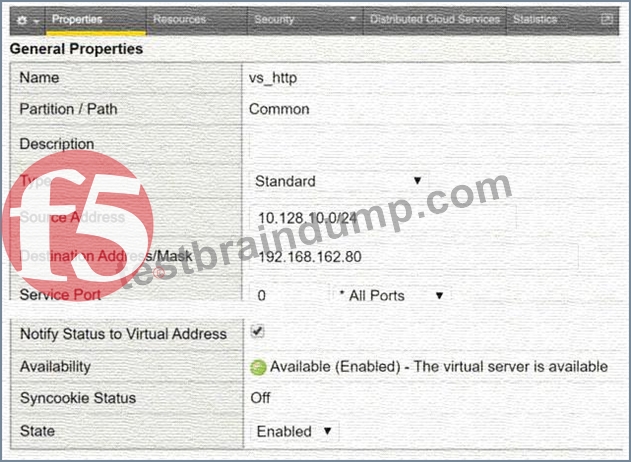
A user with IP address 192.168.162.70 is unable to connect to an HTTP application. What is a possible cause within the Virtual Server configuration?
- A. The Virtual Server is configured as a Standard Type
- B. The Source Address is configured as 10.128.10.0/24
- C. The Destination Address is configured as 192.168.162.80
- D. The Service Port is configured as 0 *All Ports
Answer: B
Explanation:
The failure to connect is caused by a restrictive Source Address filter configured on the Virtual Server.
* Source Address Filtering: In the BIG-IP system, the Source Address field on a Virtual Server acts as an implicit Access Control List (ACL). Only traffic originating from a client IP address that matches the specified network range will be accepted and processed by the Virtual Server.
* Analyzing the Exhibit: The provided configuration for vs_http shows the Source Address is set to
10.128.10.0/24. This means the Virtual Server will only accept connections from the subnet ranging from 10.128.10.1 to 10.128.10.254.
* Identifying the Conflict: The user trying to connect has the IP address 192.168.162.70. Since
192.168.162.70 does not fall within the allowed 10.128.10.0/24 range, the BIG-IP system will not match this traffic to the Virtual Server, effectively blocking the connection attempt.
* Evaluation of Other Options:
* All Ports (Option A): Configuring a Virtual Server for "All Ports" (port 0) allows it to handle traffic for any destination port, which would not block a standard HTTP application.
* Destination Address (Option B): The destination address 192.168.162.80 is the Virtual IP (VIP) users should be connecting to; this is a standard configuration and not the cause of the failure for a user reaching out to it.
* Standard Type (Option C): A "Standard" Virtual Server is the most common type used for HTTP applications as it allows for Layer 7 profiles and full proxy capabilities.
NEW QUESTION # 43
Refer to the exhibit.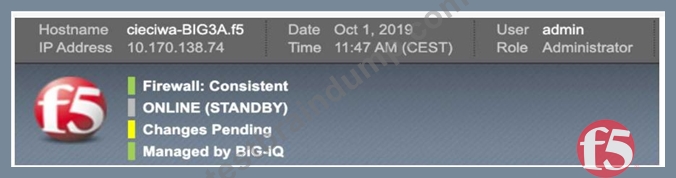
The BIG-IP Administrator has modified an iRule on one device of an HA pair. The BIG-IP Administrator notices there is NO traffic on the BIG-IP device in which they are logged into. What should the BIG-IP Administrator do to verify if the iRule works correctly?
- A. Push configuration from this device to the group and start to monitor traffic on this device
- B. Log in to the other device in the cluster, push configuration from it, and start to monitor traffic on that device
- C. Log in to the other device in the cluster, pull configuration to it, and start to monitor traffic on that device
- D. Pull configuration to this device from the cluster and start to monitor traffic on this device
Answer: A
Explanation:
Based on the provided exhibits, the BIG-IP device is currently in a Standby state ("ONLINE (STANDBY)") and has a sync status of "Changes Pending" (Yellow icon).
Understanding Device State and Traffic: In an Active/Standby High Availability (HA) pair, traffic is processed by the Active device. The exhibit confirms the administrator is logged into the Standby device, which explains why there is "NO traffic" currently observed on this specific unit.
Configuration Synchronization (ConfigSync): When an administrator modifies a local object, such as an iRule, on one member of a device group, the changes must be synchronized to the other members to ensure consistency. The "Changes Pending" status indicates that the local configuration on this device is newer than the configuration on other group members.
Push vs. Pull: * Push: Sends the configuration from the current device to the other members of the device group.
Pull: Overwrites the current device's configuration with the configuration from another member of the group.
Resolving the Scenario: Since the administrator modified the iRule on "this device," they must Push the configuration to the group so the Active device receives the updated iRule. To verify the iRule works, the administrator can then monitor the traffic on the Active device or initiate a manual failover to make "this device" Active, allowing it to process traffic with the new iRule.
Option D is the correct administrative workflow: synchronize the changes to the group (Push) and then monitor the traffic flow to validate the new logic.
NEW QUESTION # 44
Exhibit: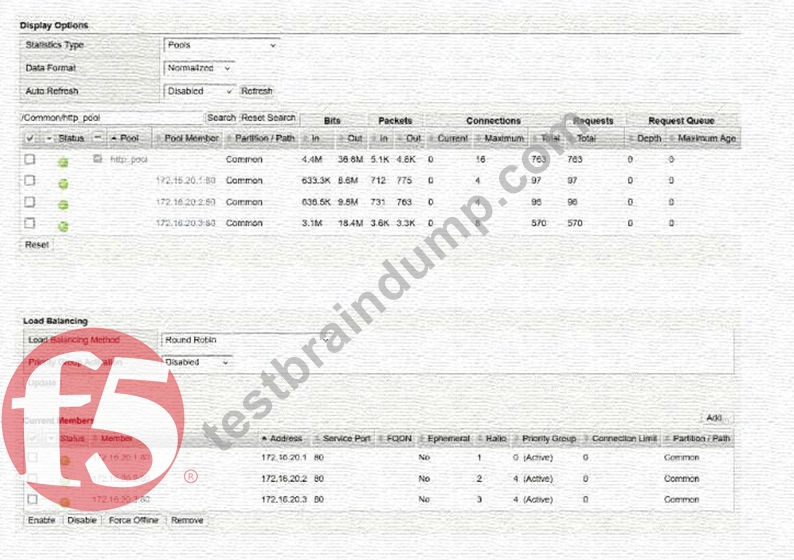
A BIG-IP Administrator configured a virtual server with a pool of 3 members and selected the Round Robin load balancing method to evenly distribute traffic across the pool members. During initial testing, traffic was not evenly distributed and the pool member 172.16.20.3 received more traffic than the other pool members.
Refer to the exhibit and the virtual server configuration provided below:
Plaintext
ltm virtual http.vs {
destination 10.10.1.100:http
ip-protocol tcp
mask 255.255.255.255
persist {
source_addr { default yes }
}
pool http.pool
profiles {
tcp{}
}
serverssl-use-sni disabled
source 0.0.0.0/0
source-address-translation {
type automap
}
translate-address enabled
}
What is the most likely cause of this behavior?
- A. Automap source address translation can cause uneven load balancing
- B. Round Robin requires an HTTP profile to work efficiently
- C. Pool members' ratio settings are causing the uneven traffic distribution
- D. A persistence profile assigned to the virtual server can cause uneven load balancing
Answer: D
Explanation:
The primary reason for the uneven traffic distribution is the presence of a Persistence Profile in the virtual server configuration.
* Load Balancing vs. Persistence: While the Round Robin method is designed to distribute new connections sequentially among pool members, Persistence overrides this logic for existing clients.
* Source Address Persistence: The configuration shows source_addr persistence is enabled. This ensures that once a client (identified by their source IP) is mapped to a pool member, all subsequent connections from that same IP will be sent to the same member for the duration of the persistence record.
* Uneven Distribution Logic: If one source IP address generates significantly more connections or longer-lived sessions than others-or if many clients appear behind a single NAT/Proxy IP-that specific pool member (in this case, 172.16.20.3) will receive a disproportionate amount of traffic compared to the others.
* Evaluating Other Options:
* Automap (Option A): SNAT Automap changes the source IP between the BIG-IP and the pool member. It does not impact the BIG-IP's ability to load balance incoming client requests.
* Ratio Settings (Option B): In the provided exhibit, the pool members have a Ratio of 1, 2, and 3 respectively. While a higher ratio does direct more traffic to a member, the question asks for the
"most likely cause" in the context of the provided ltm virtual configuration, which explicitly highlights the persistence override.
* HTTP Profile (Option C): Round Robin is a Layer 4 load balancing algorithm and does not require a Layer 7 HTTP profile to function.
NEW QUESTION # 45
Refer to the exhibit.
A BIG-IP Administrator needs to deploy an application on the BIG-IP system to perform SSL offload and re-encrypt the traffic to pool members. During testing, users are unable to connect to the application.
What must the BIG-IP Administrator do to resolve the issue? (Choose one answer)
- A. Configure Protocol Profile (Server) as splitsession-default-tcp
- B. Configure an SSL Profile (Server)
- C. Remove the configured SSL Profile (Client)
- D. Enable Forward Proxy in the SSL Profile (Client)
Answer: B
Explanation:
To successfully perform SSL offload and re-encryption on a BIG-IP system, the virtual server must be configured with both a Client SSL profile and a Server SSL profile. The Client SSL profile enables BIG-IP to decrypt inbound HTTPS traffic from clients, while the Server SSL profile is required to re-encrypt traffic before forwarding it to the pool members.
From the exhibit, the virtual server has a Client SSL profile configured, which allows BIG-IP to accept HTTPS connections from clients. However, there is no Server SSL profile attached, meaning BIG-IP attempts to send unencrypted HTTP traffic to pool members listening on HTTPS (port 443). This protocol mismatch causes the server-side SSL handshake to fail, resulting in users being unable to connect to the application.
This behavior is well documented in BIG-IP SSL troubleshooting guides: when backend servers expect HTTPS, a Server SSL profile is mandatory to establish a secure connection from BIG-IP to the pool members.
The other options are incorrect:
Removing the Client SSL profile (Option A) would break client-side HTTPS.
The server-side TCP profile (Option B) is unrelated to SSL encryption.
Forward Proxy (Option C) is only used for outbound SSL inspection scenarios.
Therefore, configuring an SSL Profile (Server) is the correct and required solution.
NEW QUESTION # 46
In the BIG-IP Configuration Utility, a user requests a single screen view to determine the status of all Virtual Servers and associated pool members, as well as any iRules in use. Where should the BIG-IP Administrator instruct the user to find this view?32
- A. Local Traffic > Virtual Servers
- B. Local Traffic > Network Map
- C. Local Traffic > Monitors
- D. Statistics
Answer: B
Explanation:
Comprehensive and Detailed Explanation From BIG-IP A41dministration Support and Troubleshooting documents: To confirm functionality across a complex environment, the "Network Map" is the most efficient troubleshooting tool in the Configuration Utility43. It provides a hierarchical, visual representation of the traffic management objects44. A single glance allows the administrator to see the status of a Virtual Server (Green/Red/Yellow), the status of its associated pool, the health of individual pool members, and which iRules are currently attached45. This view is superior to the standard "Virtual Server List" for troubleshooting because it maps the dependencies between objects46. For example, if a Virtual Server is "Red," the Network Map will show if that status is inherited from a failed pool or a specific monitor failing on a pool member. Reviewing these basic stats in the Network Map helps the administrator quickly isolate whether a failure is at the service level (Virtual Server), the logic level (iRule), or the hardware level (Pool Member).
NEW QUESTION # 47
A BIG-IP Administrator configured the following virtual server to pass traffic on all addresses and ports.
After configuration is completed, the BIG-IP Administrator notices that the virtual server is unable to pass traffic.
ltm virtual forwarding_any_vs {
destination 0.0.0.0:any
ip-forward
mask 255.255.255.255
profiles {
fastL4 { }
}
serverssl-use-sni disabled
source 0.0.0.0/0
translate-address disabled
translate-port disabled
}
Which part of the configuration is the cause of the issue? (Choose one answer)
- A. Incorrect translate-address configured
- B. Incorrect mask 255.255.255.255
- C. Incorrect destination configured
Answer: B
Explanation:
This virtual server is intended to function as aforwarding (IP-forwarding) virtual server, which is commonly used for routing or firewall-style deployments where BIG-IP forwards traffic transparently without load balancing or address translation. For a forwarding virtual server to match and passall traffic, the destination must be configured as 0.0.0.0:anywith a mask of 0.0.0.0, not 255.255.255.255.
The configured mask 255.255.255.255 represents a/32 host mask, which restricts the virtual server to matching traffic destined only for the exact IP address 0.0.0.0. Since 0.0.0.0 is not a valid routable destination for normal traffic, no packets will ever match the virtual server, causing it to pass no traffic at all.
This is a well-documented BIG-IP behavior:
* destination 0.0.0.0:any
* mask 0.0.0.0
together define acatch-all forwarding virtual server.
The destination itself (Option A) is correct for a forwarding VS, and disabling address translation (Option C) is expected and required for IP-forwarding mode. Therefore, the incorrect subnet mask is the sole reason the virtual server is not functioning as expected.
NEW QUESTION # 48
A BIG-IP Administrator is receiving intermittent reports from users that SSL connections to the BIG-IP device are failing. Upon checking the log files, the administrator notices: SSL transaction (TPS) rate limit reached. Reviewing stats shows a max of 1200 client-side SSL TPS and 800 server-side SSL TPS. What is the minimum SSL license limit capacity required to handle this peak?
- A. 0
- B. 1
- C. 2
- D. 3
Answer: B
Explanation:
Troubleshooting SSL connection resets often involves verifying license limits against actual resource utilization. F5 devices use a "Transactions Per Second" (TPS) license to control the amount of SSL processing the device can handle. The log entry SSL transaction (TPS) rate limit reached is a clear indicator that the traffic volume has exceeded the licensed capacity. When determining the necessary license level, it is important to know that F5 primarily licenses and limits the "Client-side" SSL TPS-which represents the encrypted connections between the users and the virtual servers. In this specific scenario, the peak demand reached 1200 client-side transactions per second. Although there were also 800 server-side transactions (re-encryption from the BIG-IP to the pool), these typically do not count against the primary TPS license limit in the same manner. Therefore, to ensure that the virtual server works as expected during peak load, the administrator must upgrade the license to at least 1200 TPS. This troubleshooting process links system log errors to license-enforced resource constraints.
NEW QUESTION # 49
A user needs to determine known security vulnerabilities on an existing BIG-IP appliance and how to remediate these vulnerabilities. Which action should the BIG-IP Administrator recommend?
- A. Create a UCS archive and open an F5 Support request
- B. Generate a qkview and upload to iHealth
- C. Verify the TMOS version and review the release notes
- D. Create a UCS archive and upload to iHealth
Answer: B
Explanation:
F5 recommends using the iHealth diagnostic tool to identify security vulnerabilities and receive specific remediation guidance.
QKView and iHealth: A QKView file is a comprehensive diagnostic snapshot of the BIG-IP system. When this file is uploaded to the F5 iHealth portal, it is automatically parsed against a database of known issues and security advisories.
Vulnerability Diagnosis: The iHealth platform includes automated checks specifically designed to surface security gaps and "Heuristics" that match the system's current configuration and software version to known CVEs (Common Vulnerabilities and Exposures).
Remediation Guidance: For every identified vulnerability, iHealth provides direct links to the relevant F5 Security Advisory (K-article), which contains detailed remediation steps, such as specific software versions that contain a fix or temporary mitigation commands.
UCS vs. QKView: While a UCS (User Configuration Set) file is a backup of the system configuration, it is not the format used by the iHealth diagnostic engine for automated vulnerability scanning; the QKView is the required format for this process.
NEW QUESTION # 50
What information is required for a BIG-IP Administrator to open an F5 Support ticket?
- A. Serial number of the device, qkview, packet capture files, license file, ucs file
- B. Serial number of the device, problem description, contact info
- C. Serial number of the device, qkview, problem description, contact info
- D. Serial number of the device, ucs file, license file, log files
Answer: C
Explanation:
To ensure a support case is processed and routed efficiently, F5 specifies a mandatory set of baseline information.
* Serial Number: Required to verify the support contract and entitlement level for the hardware or virtual edition.
* QKView: This is described as the "first and most important thing to have when opening a case". It provides the F5 Support Engineer with the necessary diagnostic data to understand the system's current state and resource utilization.
* Problem Description: A precise description of the issue, including symptoms, when the problem started, and the business impact, is critical for routing the case to the correct technical team.
* Contact Info: Accurate contact information for the individual who will be working on the ticket with F5.
* Comparison: While packet captures (Option A) or UCS files (Option B) are often useful, they are not strictly required for the initial opening of all support tickets; however, a QKView is considered a primary prerequisite for technical analysis.
NEW QUESTION # 51
Refer to the exhibit.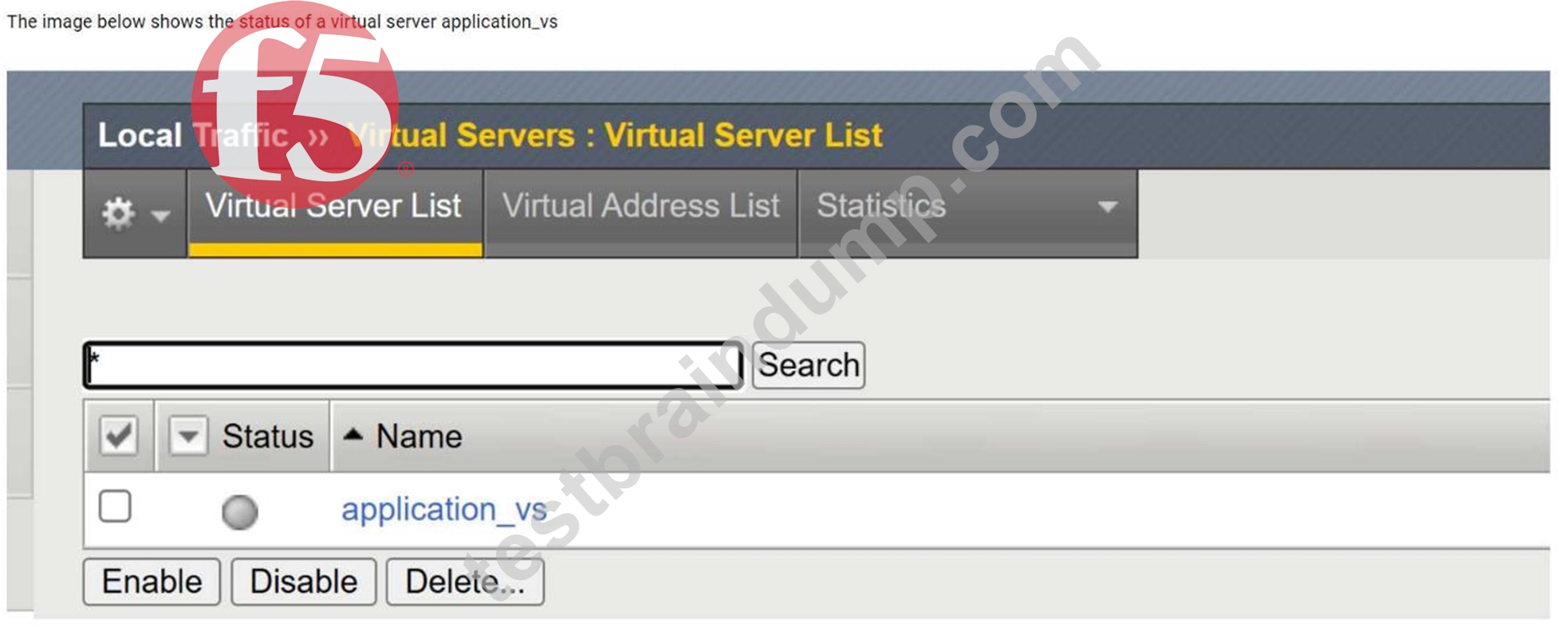
The image shows the status of a virtual server namedapplication_vsin the BIG-IP Configuration Utility.
What is the cause of the status shown? (Choose two answers)
- A. Virtual Server administratively disabled
- B. Node(s) administratively disabled
- C. Pool member(s) administratively disabled
- D. Pool member(s) forced offline
Answer: B,C
Explanation:
The exhibit shows the virtual serverapplication_vswith a status indicating it isoffline but enabled. In BIG-IP terminology, this status means the virtual server itself is administratively enabled, but it is unable to pass traffic becauseno usable pool members are available.
Two common and documented causes for this condition are:
Pool member(s) administratively disabled (Option A):When all pool members are administratively disabled, BIG-IP removes them from load-balancing decisions. Even though the virtual server remains enabled, it has no available pool members to send traffic to, resulting in an offline status.
Node(s) administratively disabled (Option C):Pool members inherit the status of their parent nodes. If a node is administratively disabled, all associated pool members are also marked unavailable. This condition causes the virtual server to show as offline, even though the virtual server configuration itself is correct.
The other options are incorrect:
Forced offline pool members (Option B)result in a different operational intent and are explicitly set for maintenance scenarios.
Virtual server administratively disabled (Option D)would show the virtual server as disabled, not enabled/offline.
This behavior is consistent with BIG-IP traffic management logic and is commonly verified by reviewingpool and node availability stateswhen diagnosing virtual server availability issues.
NEW QUESTION # 52
A BIG-IP Administrator notices that one of the servers that runs an application isNOTreceiving any traffic.
The BIG-IP Administrator examines the configuration status of the application and observes the displayed monitor configuration and affected pool member status.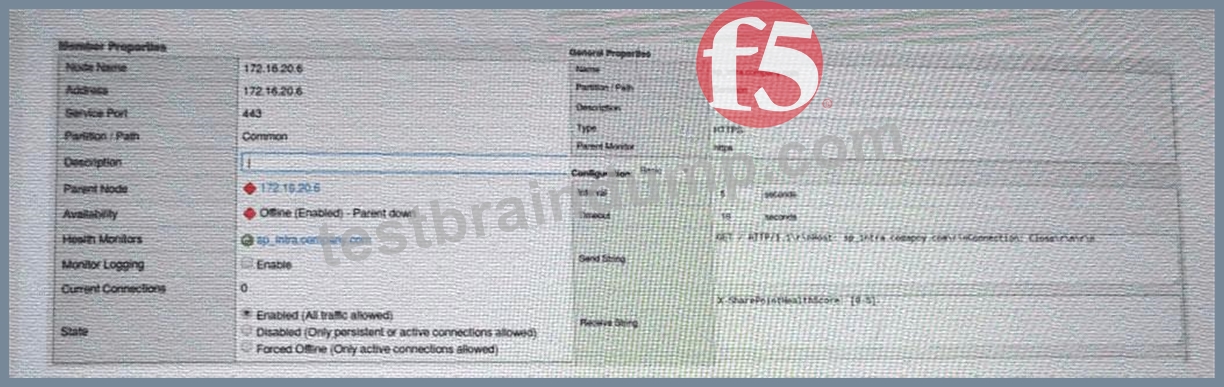
What is the possible cause of this issue? (Choose one answer)
- A. The application isNOTresponding with the expected Receive String.
- B. HTTP 1.1 isNOTappropriate for monitoring purposes.
- C. The node health monitor isNOTresponding.
- D. The BIG-IP device isNOTable to reach the pool.
Answer: C
Explanation:
The key clue in the exhibit is the pool member's availability showing"Offline (Enabled) - Parent down". In BIG-IP terminology, a pool member inherits the status of itsparent node. If thenodeis marked down (for example, by a node-level monitor or a default "node is down" condition), thenall pool members using that node IPwill also be marked down and will not receive any traffic, even if the application service on the member port might be healthy.
While the HTTPS monitor configuration (send/receive strings) is displayed, the statusspecificallyindicates anode (parent) failure, not a service-level failure. If the problem were the application not matching the receive string, you would typically see the member down due to themember's monitorfailing (and the status would reflect monitor failure details), rather than "parent down." Option D is too broad; BIG-IP can generally reach the subnet (other servers work), and this symptom points to a specific node condition. Option C is incorrect because HTTP/1.1 is commonly used for monitoring and is valid when properly formatted (especially with a Host header). Therefore, the most likely cause is that thenode health monitor is not responding, causing the node-and consequently the member-to be marked down.
NEW QUESTION # 53
A Standard Virtual Server for a web application is configured with Automap for the Source Address Translation option. The original source address of the client must be known by the backend servers. What should the BIG-IP Administrator configure to meet this requirement?
- A. An HTTP profile to insert the X-Forward-For header
- B. An HTTP Transparent profile
- C. The Virtual Server type as Performance (HTTP)
- D. A SNAT Pool with the client IP
Answer: A
Explanation:
In complex network environments, "SNAT Automap" is frequently used to ensure that backend servers send return traffic through the BIG-IP. However, SNAT hides the original client's IP address, replacing it with the BIG-IP's self-IP. When interpreting traffic flow for security or logging purposes, backend servers often need that original IP. To resolve this without breaking the network-layer routing provided by SNAT, the administrator should apply an HTTP profile to the virtual server and enable the "Insert X-Forwarded-For" option. When this is enabled, the BIG-IP inserts a standard HTTP header containing the client's original IP address before forwarding the request to the pool member. This troubleshooting method allows the backend application to log the actual user's identity while maintaining a functional L3/L4 traffic flow where the server responds to the BIG-IP's local address. This is a standard troubleshooting solution for "web server not working as expected" scenarios where applica8tion logic depends on knowing the geography or specific identity of the connecting user.
NEW QUESTION # 54
A BIG-IP Administrator adds new Pool Members into an existing, highly utilized pool. Soon after, there are reports that the application is failing to load for some users. What pool level setting should the BIG-IP Administrator check?
- A. Allow SNAT
- B. Action On Service Down
- C. Slow Ramp Time
- D. Availability Requirement
Answer: C
Explanation:
When troubleshooting a pool that is not working correctly after adding new members, the "Slow Ramp Time" setting is a primary suspect. In a pool that is already under high load and using a "Least Connections" load balancing method, a newly added server has zero connections. Without a slow ramp time, the BIG-IP will immediately direct a massive flood of new connections to the new server to "balance" it with the others. This "thundering herd" effect can crash a newly initialized application server before it has time to warm up its caches or establish its own database connections. By setting a "Slow Ramp Time" (typically in seconds), the administrator ensures the BIG-IP gradually increases the connection ratio to the new member. This allows the server to stabilize and scale up its performance over time. If users report intermittent failures specifically coinciding with the expansion of a pool, checking this setting is a vital troubleshooting step to maintain pool health during maintenance.
NEW QUESTION # 55
A BIG-IP Administrator makes a configuration change to the BIG-IP device. Which file logs the message regarding the configuration change?
- A. /var/log/messages
- B. /var/log/user.log
- C. /var/log/audit
- D. /var/log/secure
Answer: C
Explanation:
The BIG-IP system uses the audit log to track administrative actions and configuration changes.
Audit Logging Functionality: When a user modifies the configuration via the Configuration Utility (GUI), the Traffic Management Shell (tmsh), or iControl, the system records the event in the audit log. This includes the name of the user who made the change, the timestamp, and the specific command or object that was modified.
Log Location: The audit log is stored at /var/log/audit.
Evaluation of Other Options:
/var/log/messages (Option A) contains general system and kernel messages but is not the primary source for configuration change details.
/var/log/secure (Option B) primarily logs authentication and authorization attempts (logins and logouts).
/var/log/user.log (Option D) is a generic Linux log file for user-level applications and does not track BIG-IP LTM configuration changes.
NEW QUESTION # 56
A BIG-IP Administrator is informed that traffic on Interface 1.1 is expected to increase over the maximum bandwidth capacity on the link. There is a single VLAN on the Interface. What should the BIG-IP Administrator do to increase the total available bandwidth?
- A. Set the media speed of Interface 1.1 manually
- B. Create a trunk object with two Interfaces
- C. Increase the MTU on the VLAN using Interface 1.1
- D. Assign two Interfaces to the VLAN
Answer: B
Explanation:
When a physical network link (like Interface 1.1) reaches its maximum capacity, it creates a bottleneck that negatively impacts network-level performance. To overcome the physical limits of a single interface, BIG-IP administrators use "Trunking," which is the F5 term for Link Aggregation (often implemented via LACP). A trunk object bundles multiple physical interfaces into a single logical link. By creating a trunk with two or more interfaces, the BIG-IP can spread the traffic load across all members of the trunk, effectively doubling or tripling the available bandwidth for the associated VLANs. Beyond performance, troubleshooting redundancy often leads to the use of trunks; if one cable in a trunk fails, the others continue to carry traffic, preventing a complete outage. This is a superior solution to simply increasing MTU (which requires end-to-end support) or manually setting media speeds. In a high-availability environment, configuring trunks is a foundational troubleshooting and optimization step to ensure that traffic spikes do not result in packet loss due to link saturation.
NEW QUESTION # 57
The BIG-IP Administrator is investigating disk utilization on the BIG-IP device. (Exhibit shows /dev/md4 mounted on / at 100% utilization). What should the BIG-IP Administrator check next?
- A. Large files on the / file system
- B. Results from the EUD test
- C. Results from the platform diagnostics test
- D. Large files on /usr file system
Answer: A
Explanation:
Monitoring resource utilization is essential for maintaining system stability. If the root (/) file system reaches
100% capacity, the BIG-IP may become unresponsive, fail to save configuration changes, or experience daemon crashes83. When the / partition is full, the immediate troubleshooting step is to identify large or unnecessary files-such as old log files, core dumps, or temporary installer files-located specifically within that file system84. In the provided exhibit, /dev/md4 is explicitly listed at 100% usage for the / mount point85. Checking other partitions like /usr (which is at 82% in the exhibit) would not resolve the immediate
"Full" status of the root directory86. Administrators often use the du (disk usage) command via the CLI to find the problematic files. Managing disk space is a proactive task; however, when utilization hits 100%, it becomes a reactive troubleshooting emergency that must be resolved to restore the management plane's functionality.
NEW QUESTION # 58
......
Powerful F5CAB5 PDF Dumps for F5CAB5 Questions: https://actualtests.testbraindump.com/F5CAB5-exam-prep.html
